Introduction
MQTT is a publish/subscribe protocol. Clients never talk to each other directly. They publish messages to topics (cam/frontdoor/events), and a broker forwards each message to whoever is subscribed at that moment. It was designed for constrained devices and unreliable links, which is why it’s everywhere in IoT. A battery-powered sensor can wake up, read something, publish its data, and go back to sleep. If the message is flagged retained, the broker keeps the last value on that topic and delivers it to every new subscriber as soon as it connects.
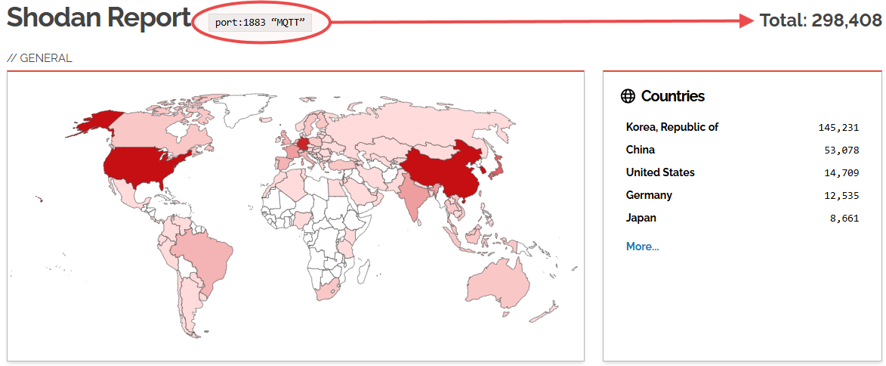
The protocol doesn’t require authentication; that is up to the broker’s configuration. Mosquitto, the broker selected for this lab, has refused anonymous remote connections by default since version 2.0 (2020), so an open broker today is the administrator’s choice. Some articles suggest this choice is still too common. My own Shodan query, port:1883 “MQTT”, returned 298,408 hosts on 2026-10-05. Although this does not prove anything, scrolling through the results shows leaked $SYS topics, which suggests misconfigured security. This is enough to motivate this lab.
The question here isn’t whether an open broker leaks; it does. It’s what each fix actually changes. I run the same read attack against four configurations of the same broker: open, password with a flat ACL, ACL per identity, and mutual TLS. For each one I look at what the attacker gets and what shows up in the log and on the wire. I do not cover how credentials can be obtained; that is out of scope here.
The lab
You can find the full lab at FootholdLab MQTT_Lab Repo. The README has more details about the lab, but I’ll explain the minimum needed to understand the rest of the article.
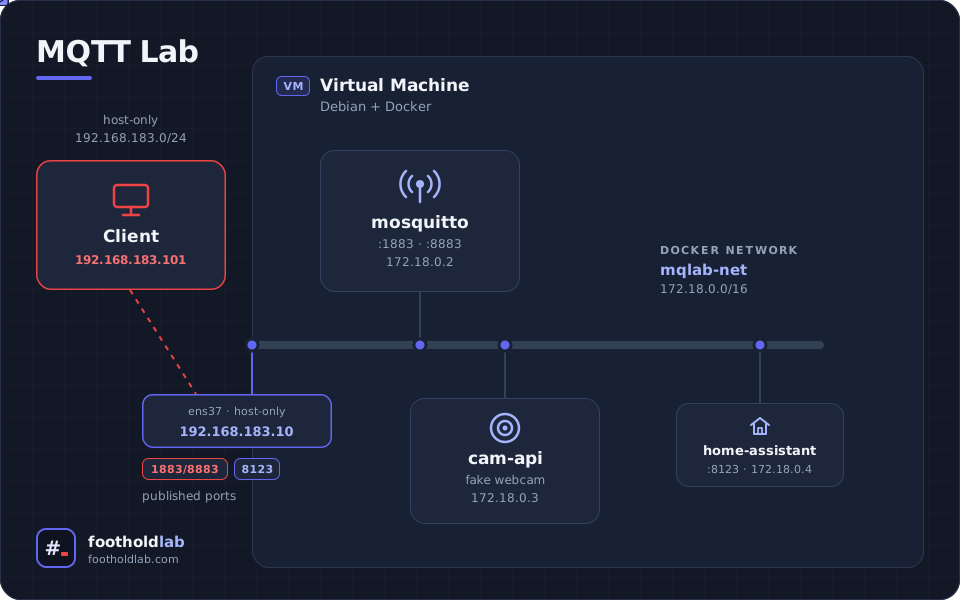
The lab consists of two VMs on a private network. One is the client (the attacker); the second is a Debian host running Docker with three containers: the Mosquitto broker, a simulated webcam, and a third one included for future tests, which we will not use here.
The IPs are:
192.168.183.10 -> Docker server
192.168.183.101 -> The client
Docker has an internal network for the lab: 172.18.0.0/16
 Important Note:
In the results, Mosquitto can appear with two IPs depending on the source of the information. The command line shows only the Docker server IP; network captures taken on the Docker server show the internal Docker IPs.
The setup is similar for all the configurations tested, but some changes are required as we add security. It is all explained in the Git repository; in this article I will focus on the results.
Lab Tests
We will go through four scenarios. Full details are in the GitHub repository, but I will provide here the minimum details needed to understand each scenario.
No Password
Mosquitto allows subscription to all topics by subscribing to “#”. MQTT treats # as a wildcard, so we tell the broker we want to receive everything. Topics starting with $ are special and not included.
Command
mosquitto_sub -h 192.168.183.10 -t '#' -v -F 'ret=%r %t %p'
Output:
ret=1 cam/frontdoor/config {"name": "Front Door", "model": "LabCam 1000", "stream_url": "rtsp://admin:lab-fake-cam-pass@192.168.183.50:554/Streaming/Channels/101"}
ret=1 cam/frontdoor/status online
ret=0 cam/frontdoor/events {"event": "motion", "ts": 1791557788}
ret=0 cam/frontdoor/events {"event": "idle", "ts": 1791557793}
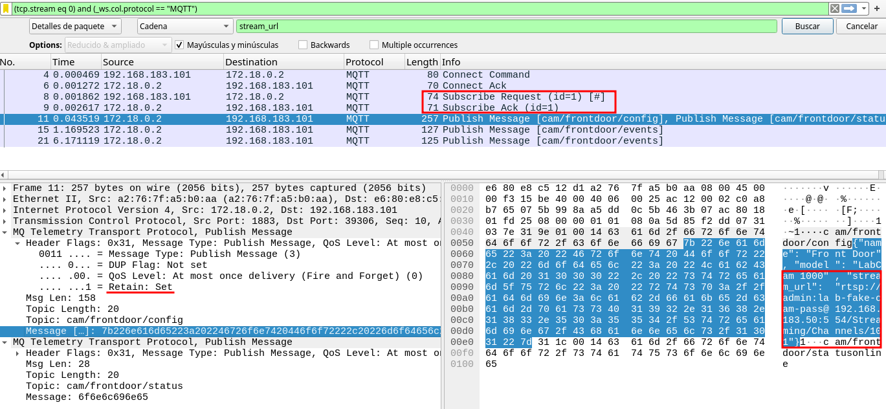
As expected, we can subscribe without a password. The first two messages are retained (ret=1); the rest are live messages. Usually we should not see a connection URL with credentials, but we could find information about IoT devices that would help map the network. The key point is that MQTT needs to be secured.
The image shows the traffic of the request.
Another topic we can subscribe to is $SYS/, where the broker publishes its own messages:
mosquitto_sub -h 192.168.183.10 -t '$SYS/#' -v
Output:
$SYS/broker/version mosquitto version 2.1.2
$SYS/broker/uptime 1503 seconds
………………………
$SYS/broker/connections/socket/count 70
$SYS/broker/publish/messages/received 305
$SYS/broker/publish/messages/sent 464
I’ve removed most of the output; it is just a long list of broker statistics.
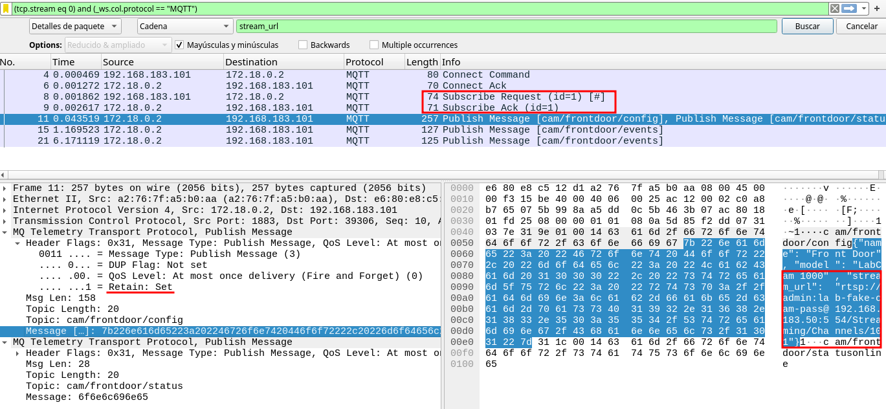
Again, we can see it in Wireshark:
The last test we will do is to subscribe to the camera topic:
mosquitto_sub -h 192.168.183.10 -t 'cam/frontdoor/config' -v -C 1
Output:
cam/frontdoor/config {"name": "Front Door", "model": "LabCam 1000", "stream_url": "rtsp://admin:lab-fake-cam-pass@192.168.183.50:554/Streaming/Channels/101"}
In this example we get the retained message we saw before. In real life it would be more common to collect information the camera sends, like statistics or alerts.
It is evident this type of configuration is terrible and needs some hardening.
Basic ACL
Configuration improvements
For this scenario I keep the retained messages but add users, passwords and an ACL. User svc_cam is intended for the webcam (our fake camera), and svc_health for health monitoring. In this case, Docker uses this user to check the status of the container.
# Camera service: owns its own subtree.
user svc_cam
topic readwrite cam/frontdoor/#

# Monitoring service meant to read health only
# misconfigured for the purpose of the test.
user svc_health
topic read cam/#
topic read $SYS/#
# Home Assistant user
# Also over-broad on cam (read cam/#) in this scenario.
user svc_ha
topic readwrite homeassistant/#
topic readwrite home/lab/#
topic read cam/#
I have included a user svc_ha for Home Assistant, an open-source home automation application. Mosquitto’s typical role here is to exchange messages between Home Assistant and devices or sensors. For example, a battery-powered thermometer wakes up and sends a message with the temperature. Home Assistant is subscribed to the topic, so the broker forwards the message to it as soon as it arrives.
Lab results
We start with the same command as in the first lab:
mosquitto_sub -h 192.168.183.10 -t '#' -v -d
Output:
Client null sending CONNECT
Client null received CONNACK (5)
Connection error: Connection Refused: not authorised.
Client null sending DISCONNECT
The new settings are working and anonymous login is no longer possible. This is what the Mosquitto log (mosquitto.log) shows:
2026-10-09T16:04:55: New connection from 192.168.183.101:32800 on port 1883.

2026-10-09T16:04:55: Sending CONNACK to auto-0CEEF93F-3896-B18A-DEED-2763476058CB (0, 5)

2026-10-09T16:04:55: Client auto-0CEEF93F-3896-B18A-DEED-2763476058CB [192.168.183.101:32800] disconnected: not authorised.
The lines correspond to the connection, deny and disconnection.
The denial is the 5 in (0, 5), which corresponds to the return code in the network traffic. Although the packet looks like an acceptance (Connect Ack), the return code carries the refusal.
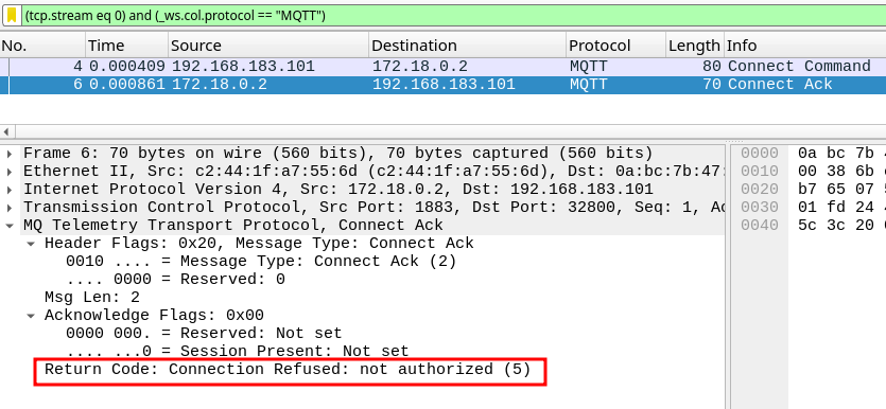
Next we check access to something the ACL allows:
mosquitto_sub -h 192.168.183.10 -u svc_health -P 'S3cret-health' -t 'cam/frontdoor/config' -v -C 1
Output:
cam/frontdoor/config {"name": "Front Door", "model": "LabCam 1000", "stream_url": "rtsp://admin:lab-fake-cam-pass@192.168.183.50:554/Streaming/Channels/101"}
This is allowed by the ACL, but logically a health service should not access the webcam configuration. I introduced this misconfiguration to show how important it is to define the filters correctly.
What the network shows:
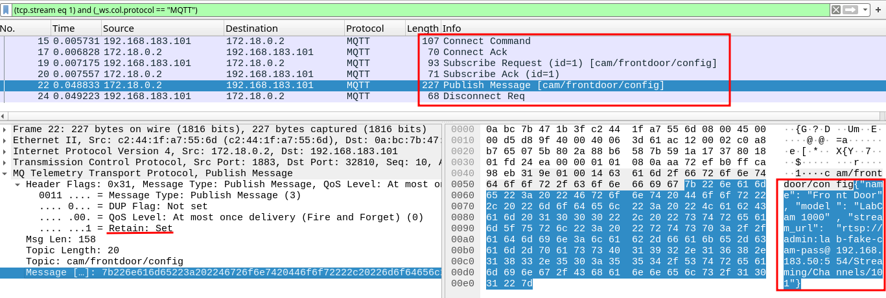
It shows a successful connection, the subscription, the published message and, finally, the client disconnecting.
We’ll do a more restrictive ACL configuration.
ACL strict
Now we filter the camera topic by client ID, which restricts it to a specific client. We also remove svc_health’s access to the camera. svc_ha plays the role of the server that would normally need access to the camera to bring relevant information to a dashboard. This configuration has a security problem that I have not explored: %c represents the client ID, but nothing verifies it. Anyone could identify as frontdoor and access the data. It might be part of a future lab.
# Any client may only touch the camera subtree matching its own client-id.
# camera connects with client-id "frontdoor" -> cam/frontdoor/#
pattern readwrite cam/%c/#

# Monitoring service: health topic and broker stats only. No camera access.
user svc_health
topic read health/#
topic read $SYS/#
# Home Assistant: own namespace. Reads only camera EVENTS, never config.
user svc_ha
topic readwrite homeassistant/#
topic readwrite home/lab/#
topic read cam/+/events
At this point we also disable retained messages. The only reason is to see the difference: in a setup where devices connect at any time to read something shared in the past, disabling it makes no sense, but let’s see what it means. We do this with the following line in mosquitto.conf: retain_available false
We also need to change our fake webcam so it sends messages with retain set to 0; otherwise the broker rejects them. Both versions of the script are on GitHub.
Tests
We try to subscribe to the events topic as Home Assistant. The ‘+’ represents a level in the topic. This command should work because we allow it in the last line in the ACL. Otherwise it would be restricted to its client id topics.
mosquitto_sub -h 192.168.183.10 -u svc_ha -P 'S3cret-ha' -t 'cam/+/events' -v -W 8
Output:
cam/frontdoor/events {"event": "motion", "ts": 1791543904}
cam/frontdoor/events {"event": "idle", "ts": 1791543909}
Timed out
We can see the connection packet, the subscription request, the ACK from the broker, and how the broker forwards the messages arriving from the camera.
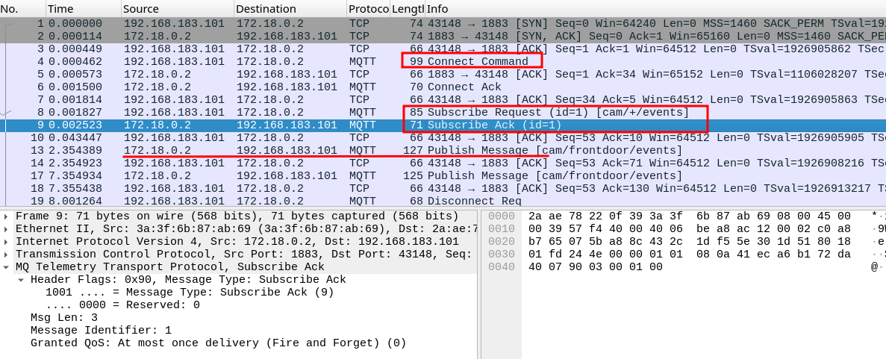
It ends with a timeout, which is what we set with the -W flag.
Let’s try to subscribe to something we are not allowed to read, using valid credentials.
mosquitto_sub -h 192.168.183.10 -u svc_health -P 'S3cret-health' -t 'cam/#' -v -W 8
The command returns nothing: neither data nor errors.
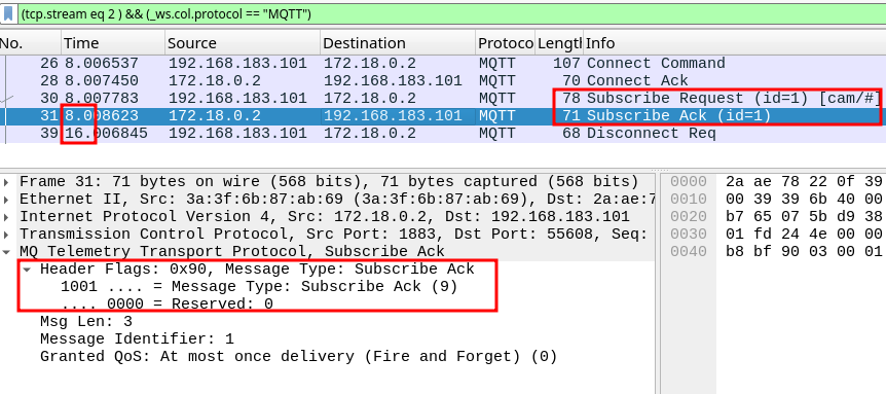
The network shows what happens: the client subscribes and the broker accepts, but no messages are sent. The broker applies the ACL when delivering messages to subscribers, not when accepting the subscription.
The following command publishes a message as the camera, but with the retain flag set (-r parameter). Since we disabled this option in the broker, it should not accept it.
mosquitto_pub -h 192.168.183.10 -u svc_cam -P 'S3cret-cam' -i frontdoor -t cam/frontdoor/config -m x -r -q 1 -d
Output:
Client frontdoor sending CONNECT
Client frontdoor received CONNACK (0)
Client frontdoor sending PUBLISH (d0, q1, r1, m1, 'cam/frontdoor/config', ... (1 bytes))
Error: The connection was lost.
The broker accepts the connection, but the client returns an error. We know why, but let’s look at the network:
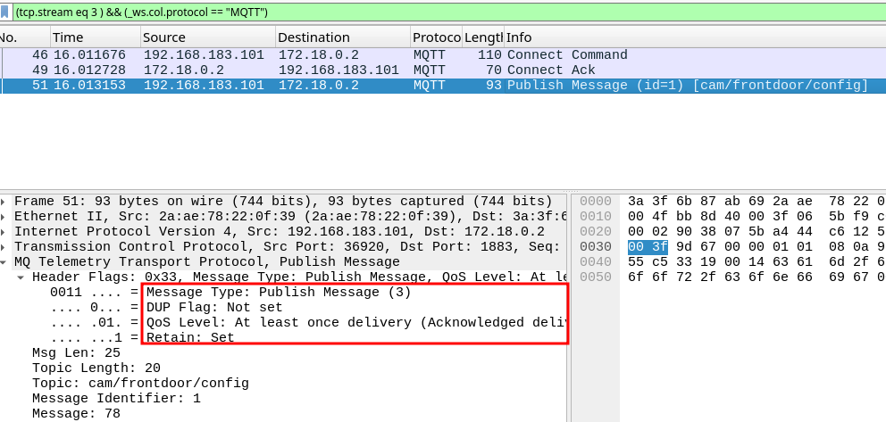
The client is connected, but the broker closes the connection and the client reports an error.
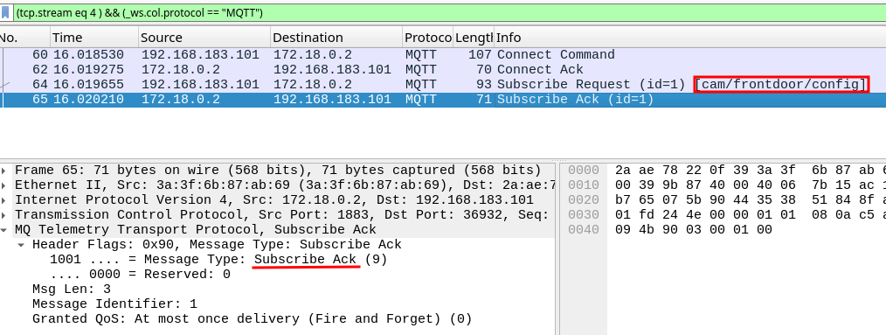
Let’s do one last test to see if we can read the secrets as we did in the previous tests:
mosquitto_sub -h 192.168.183.10 -u svc_health -P 'S3cret-health' -t 'cam/frontdoor/config' -v -C 1
This time we cannot see anything. The message we are looking for is not stored since we removed the retain option. But even if it were stored, this user would have no access to it because of the ACL.
In the network traffic we see, as in our second test, that we can subscribe but no message is retrieved. The secrets are safer with this ACL configuration.
TLS configuration
This scenario requires several changes, described in more detail on GitHub. In summary:
- Create the certificates. A script is available.
- Update the configuration to enable TLS, add port 8883, and give Mosquitto the path to the certificates.
- Modify our fake webcam code to use the certificates so it can send messages.
Note that we keep port 1883 exposed in Docker to allow testing the previous scenarios, but in a real setup it should be closed. Let’s try the following commands from the previous labs:
mosquitto_sub -h 192.168.183.10 -u svc_health -P 'S3cret-health' -t 'cam/#' -v -W 5

mosquitto_sub -h 192.168.183.10 -u svc_cam -P 'S3cret-cam' -i frontdoor -t 'cam/frontdoor/#' -v -W 5

mosquitto_pub -h 192.168.183.10 -u svc_cam -P 'S3cret-cam' -i frontdoor -t cam/frontdoor/config -m 'x' -r

mosquitto_sub -h 192.168.183.10 -u svc_health -P 'S3cret-health' -t 'cam/frontdoor/config' -v -C 1
The response is exactly the same for all four:
Error: Connection refused
This is expected because the broker is configured for TLS only. In the traffic, the client sends a SYN and the broker closes the connection with RST, ACK.
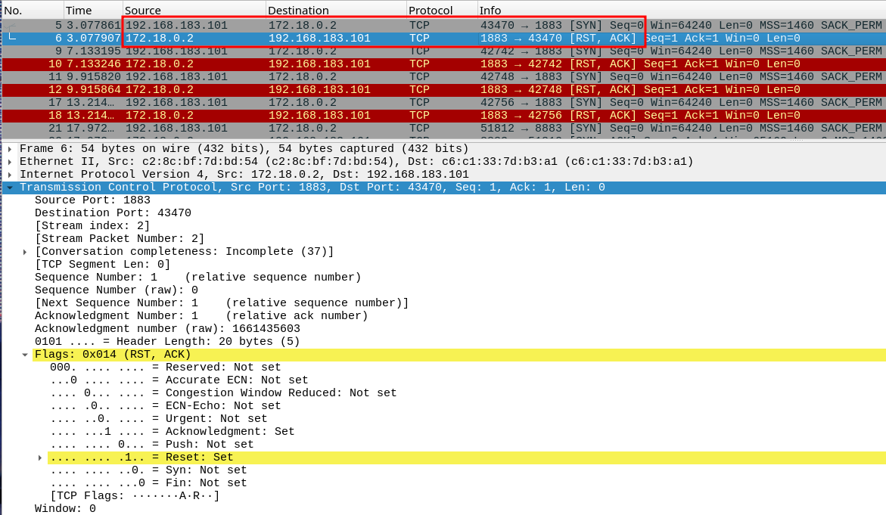
Now we check what happens with a valid request:
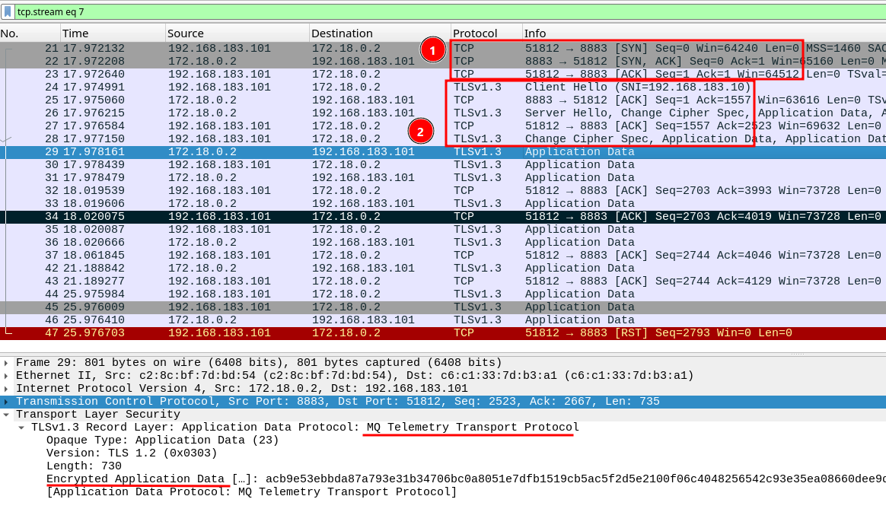
mosquitto_sub -h 192.168.183.10 -p 8883 --cafile certs/ca.crt --cert certs/svc_ha.crt --key certs/svc_ha.key -t 'cam/+/events' -v -W 8
Output:
cam/frontdoor/events {"event": "idle", "ts": 1791576033}
cam/frontdoor/events {"event": "idle", "ts": 1791576038}
Timed out
In this case we receive the messages from the events topic. The traffic is the most interesting part: we see the TCP three-way handshake complete and then the TLS handshake setting up the encrypted connection. After that come the “Application Data” packets, which carry the MQTT traffic that we can no longer read.
In this scenario the identity is tied to the certificate, which can be configured to improve identity management.
With this configuration we greatly reduce the risks.
Conclusion
By analyzing the behavior of Mosquitto with different configurations, we can identify some weaknesses that attackers could exploit. The recipe to maximize security is well known: good configuration, encryption and protected credentials. This protocol is often used in home automation installations that can have a large number of sensors, lamps, switches, cameras and anything else that is remotely managed. Compromising any of them can give access to the broker. Every setting closes one door and may open another. Security is not the strictest configuration, but the right combination for your broker’s job.
If you have reached this point, thank you for reading. Do not hesitate to share comments, criticism or recommendations.
:wq